SSC Photo and Signature Size for CGL, CHSL, MTS & GD
SSC photo and signature size explained: typical 20–50 KB photo, 10–20 KB signature, pixel values, live photo capture and how to fix rejected uploads.
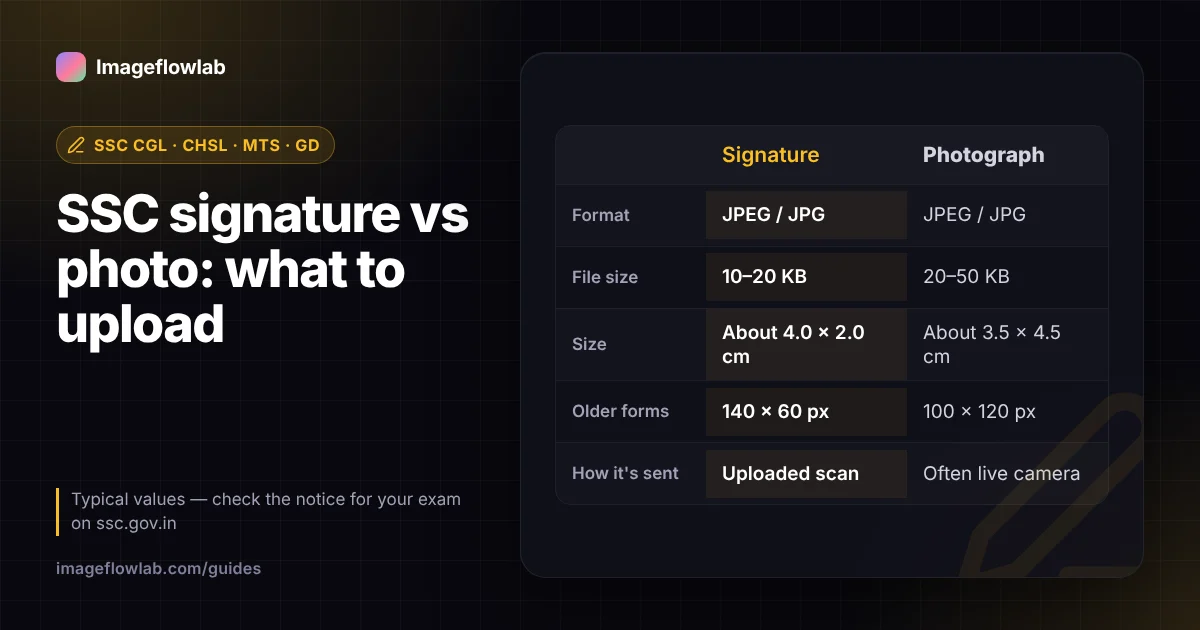
For SSC exams such as CGL, CHSL, MTS and GD, the signature is typically a JPEG of 10–20 KB (about 4.0 × 2.0 cm, or 140 × 60 pixels on older forms) and the photograph a JPEG of 20–50 KB (about 3.5 × 4.5 cm). On the newer SSC portal the photograph is often captured live through a camera instead of uploaded, so the file you prepare most often is the signature. The exact rules sit in the notice for your exam, and they do change.
What are the typical SSC photo and signature requirements?
CGL, CHSL, MTS and GD run through the same SSC registration system, so recent cycles have shared broadly the same rules. The wording, dimensions and capture method have still shifted over time, so treat the table as a starting point.
| Item | Typical format | Typical file size | Typical dimensions |
|---|---|---|---|
| Signature | JPEG / JPG | 10–20 KB | About 4.0 × 2.0 cm; 140 × 60 px on older forms |
| Photograph (if uploaded) | JPEG / JPG | 20–50 KB | About 3.5 × 4.5 cm; 100 × 120 px on older forms |
| Live photograph | Captured on the portal or app | Handled by the portal | Framed by on-screen guides |
These are typical values, not a guarantee. Always check the "Instructions for uploading photograph and signature" section in SSC's notice for your exam on ssc.gov.in before you submit.
How does the live photo capture on the SSC portal work?
On SSC's newer one-time registration system, many applications ask you to take a photograph through a webcam or phone camera instead of uploading one. The portal shows a frame for your face and checks the result. The screens can differ between registration, application and corrections, so read the instructions each time.
A few habits help the live capture pass on the first try:
- Sit facing a window or a soft light so your face is evenly lit, with no strong shadow on one side.
- Use a plain, light wall behind you. Posters, doors and patterned curtains confuse face detection.
- Remove caps and, where the notice says so, spectacles. Recent SSC notices have asked for photos without either.
- Look straight at the lens, keep a neutral expression and keep both ears roughly visible.
Because the portal handles the captured file itself, you usually do not need to resize anything for the live photo. If your notice still asks for an uploaded photo, prepare it to the size it states using the exam photo resizer, which has an SSC preset for 20–50 KB.
What should an SSC signature look like?
The signature is where most uploads go wrong. SSC's instructions have consistently asked for your own running signature on white paper with a dark pen. Check these before you scan it:
- Ink: use a black or dark blue pen with a firm line. Faint ballpoint strokes disappear when the image is compressed to 20 KB.
- Paper: plain white, unruled paper. Lines from a notebook show up as grey stripes.
- Style: sign as you normally do. Signatures in capital letters are rejected by many recruitment bodies, and the same signature is compared at the exam venue.
- Framing: the image should contain only the signature, without the edge of the page, your fingers or a desk in view.
How do you resize an SSC signature step by step?
You can do the whole job on a phone. The signature resizer runs in the browser, so the scan of your signature is processed on your own device rather than uploaded to a server.
- Sign three or four times on a sheet of white paper and pick the cleanest one.
- Photograph it in daylight, holding the phone directly above the page so the signature is not skewed. A flatbed scan also works.
- Open the signature resizer and load the photo. JPG, PNG and WEBP files are accepted; convert HEIC photos from an iPhone to JPG first.
- Choose the SSC preset. It fills in 140 × 60 px and a 10–20 KB range. If your notice states different numbers, type them into the width, height and KB fields instead.
- Leave Auto-crop to the signature on so the tool trims to the ink with a small white margin, and keep Clean background on to whiten the paper and darken the strokes.
- Check the result panel. It lists the pixel size, the file size in KB and whether it falls inside the range.
- Download the JPG and upload it to the SSC form.
Worked example: from a phone photo to a 140 × 60 px file
Say your phone takes a 4000 × 3000 px photo of the page, about 3 MB. The signature itself occupies a strip roughly 1400 × 600 px in the middle. Auto-crop isolates that strip, which already has the 7 : 3 shape that 140 × 60 px needs, and scaling it down gives a sharp 140 × 60 px image.
A clean black-on-white signature at that size often encodes to under 10 KB even at maximum JPEG quality, because it is mostly flat white. The tool then keeps the picture unchanged and adds harmless comment padding inside the JPEG so the file lands within 10–20 KB, and the check list says so.
What does "KB" mean on the SSC form?
Some portals count 1 KB as 1,024 bytes and others as 1,000. For a 10–20 KB limit, a file between 10,240 and 20,000 bytes satisfies both readings, and the resizer aims for that overlap. If you want to understand why JPEG files shrink so much at low quality, the guide on what image compression is explains it.
Why do SSC photo and signature uploads get rejected?
Rejections usually come from a short list of causes. Most can be fixed in a few minutes.
| Problem | Likely cause | Fix |
|---|---|---|
| "File size exceeds limit" | Uploading the original phone photo | Resize to the KB range in the notice |
| "File too small" | Over-compressed or tiny image | Use a range-aware tool or raise quality |
| Invalid format | PNG, HEIC or PDF instead of JPG | Export as .jpg |
| Signature unreadable | Faint ink, shadow, grey paper | Re-sign with a dark pen in daylight |
| Signature in capitals | Name written in block letters | Use your usual running signature |
| Live photo fails | Backlight, cap, glasses, busy wall | Face the light, plain wall, nothing on the face |
SSC also compares your photo and signature with you on exam day and at document verification, so use your current appearance and the signature you will write in the exam hall.
Frequently asked questions
Summary
For SSC CGL, CHSL, MTS and GD, plan on a 10–20 KB JPEG signature and, where an upload is still required, a 20–50 KB photograph, then confirm both against the current notice. Expect the photograph to be captured live on the newer portal and prepare a clean, well-lit setting for it. For the signature, sign on white paper, photograph it straight on, and run it through the signature resizer with the SSC preset to get a correctly sized JPG in one pass.