Instagram Grid Posting Order
Post an Instagram puzzle grid in the right order: last tile first. Tile sizes for the 3:4 profile view, seamless carousels and fixes for misaligned grids.
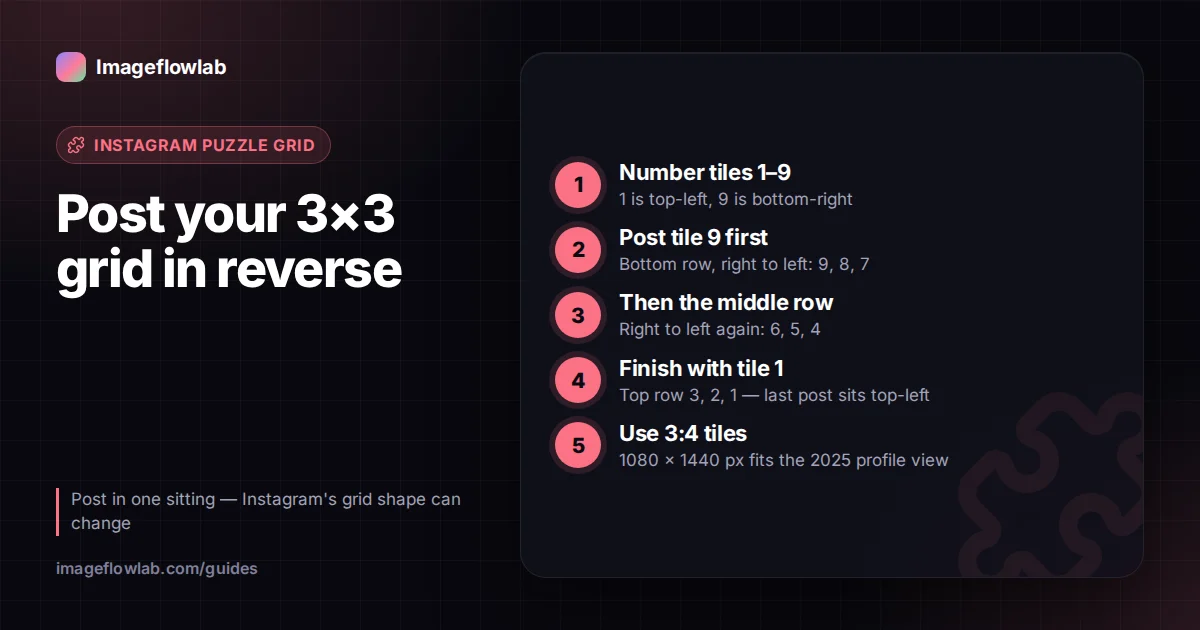
To build an Instagram puzzle grid, post the tiles in reverse: the bottom-right tile goes up first and the top-left tile goes up last. Instagram always places your newest post in the top-left corner of your profile, so posting backwards is the only way the picture assembles the right way round. This guide covers the exact order for common layouts, the tile sizes that suit today's profile view, and how seamless carousels differ.
Why does an Instagram grid have to be posted backwards?
Your profile is a three-column feed sorted by date, newest first. Every time you publish, the new post takes the top-left slot and everything else shifts one place to the right. A post that was in the third column wraps down to the first column of the next row.
So the last tile you publish ends up top-left. Post a 3×3 puzzle in reading order and the rows appear reversed and flipped.
The three columns are also why a grid must be three tiles wide. A 2×2 or 4×4 split never lines up with the profile.
What is the posting order for a 3×3 grid?
Number the tiles in reading order, 1 at top-left and 9 at bottom-right. Then publish them like this:
- Tile 9 (bottom row, right)
- Tile 8 (bottom row, middle)
- Tile 7 (bottom row, left)
- Tile 6 (middle row, right)
- Tile 5 (centre)
- Tile 4 (middle row, left)
- Tile 3 (top row, right)
- Tile 2 (top row, middle)
- Tile 1 (top row, left), which goes last
Any grid follows the same rule: bottom row first, each row from right to left.
Keeping track of nine files on a phone is where most mistakes happen. The Image Splitter has an Instagram profile order option that numbers files as post01, post02 and so on, with post01 being the bottom-right tile. Sort the folder by name and publish from the top of the list.
Which tile size should you use?
As of 2025, Instagram changed profile grid previews from squares to a taller 3:4 crop. Feed posts themselves can still be square or portrait, but what visitors see on your profile is a 3:4 thumbnail. Instagram changes its layout from time to time, so open your own profile and check the current shape before you plan a grid.
| Goal | Tile shape | Tile size at 1080 px wide | Notes |
|---|---|---|---|
| Profile puzzle grid (current preview) | 3:4 | 1080 × 1440 px | Matches the 2025 profile thumbnail, so nothing is trimmed |
| Profile puzzle grid (older square style) | 1:1 | 1080 × 1080 px | Top and bottom edges are hidden by a 3:4 preview |
| Carousel panorama | 4:5 or 1:1 | 1080 × 1350 or 1080 × 1080 px | All slides take the shape of the first slide |
If you post square tiles on a 3:4 grid, Instagram fills the taller thumbnail by cropping the sides of each tile instead. The joins between tiles then no longer match, and the puzzle looks broken even though you posted in the right order.
Worked example: how many pixels do you need?
A 3×3 grid of 3:4 tiles at 1080 × 1440 px each needs a source image of 3 × 1080 = 3240 px wide and 3 × 1440 = 4320 px tall. That is a 3:4 image of about 14 megapixels, which most recent phones and cameras can provide.
A 3×1 row of square tiles needs 3240 × 1080 px, a 3:1 panorama. If your photo is smaller, the tiles will be upscaled to reach 1080 px wide and may look soft. In that case consider a 3×1 or 3×2 layout instead of a full 3×3, or run the photo through an image upscaler before splitting.
How do you make a seamless carousel?
A carousel panorama works the other way. Instead of nine separate posts, you publish one post containing several slides. People swipe left and the image continues from one slide into the next.
Because it is a single post, the order is simply left to right: slide 1 is the left edge of the panorama, the last slide is the right edge. Nothing is reversed. As of 2025, Instagram allows up to 20 photos or videos in one carousel, but check current behaviour in the app, as limits have changed before.
Keep these points in mind:
- Instagram crops every slide to the shape of the first one, so export all slides with the same aspect ratio.
- Portrait 4:5 slides fill more of the screen than squares.
- A wide panorama needs a lot of horizontal pixels. Five 4:5 slides at 1080 px wide means a source of 5400 × 1350 px.
In the Image Splitter, the Carousel panorama preset uses one row, names files slide01, slide02 and onwards, and lets you set up to 10 slides per split. For more slides, split the image into two halves and process each one.
Step by step: planning and posting a puzzle grid
- Pick the layout. 3×1, 3×2 or 3×3. Bigger grids need more pixels.
- Choose the tile shape. Use 3:4 for the current profile view and keep the subject away from the outer edges.
- Split and number. Split the image in profile order so the files are already named in posting sequence.
- Move the files to your phone. Unpack the ZIP and save the tiles to an album.
- Post in one session. Publish post01 first and continue in order without posting anything else in between.
- Check after each row so you can fix a mistake early.
Why does my grid look misaligned?
When a puzzle grid looks wrong, the cause is almost always one of these:
- Wrong order. One tile was posted out of sequence. Archive or delete the posts back to that point and re-post.
- Something else got in between. A post published mid-sequence, from you or a scheduled tool, shifts every following tile by one slot.
- Pinned posts. Pinned posts sit at the start of the grid and push everything else along. Unpin them while you post, then decide if you want them back.
- Deleted or archived tiles. Removing one tile later closes the gap and shifts every older post by one slot, which splits the rows. Archive the whole grid together if you need to take it down.
- Wrong tile shape. Square tiles shown in a 3:4 preview lose their sides and no longer meet.
A puzzle grid only stays intact until your next post. Every new upload shifts all tiles by one place, which breaks the columns. Many accounts post grids in blocks of three, so that one new row of three posts keeps the earlier puzzle aligned.
Frequently asked questions
Summary
A puzzle grid is published in reverse, starting with the bottom-right tile and ending top-left, while a carousel panorama is added left to right in a single post. Use 3:4 tiles for the profile view Instagram introduced in 2025, keep checking the app for changes, and post the whole sequence in one sitting. To cut the image and get files already numbered in posting order, use the Image Splitter, and see the social media resizing guide for other platform sizes.