Passport Photo Size by Country
Passport photo sizes by country in one table: US 2×2 in, UK and EU 35×45 mm, Canada 50×70 mm, China 33×48 mm, plus head size and background rules.
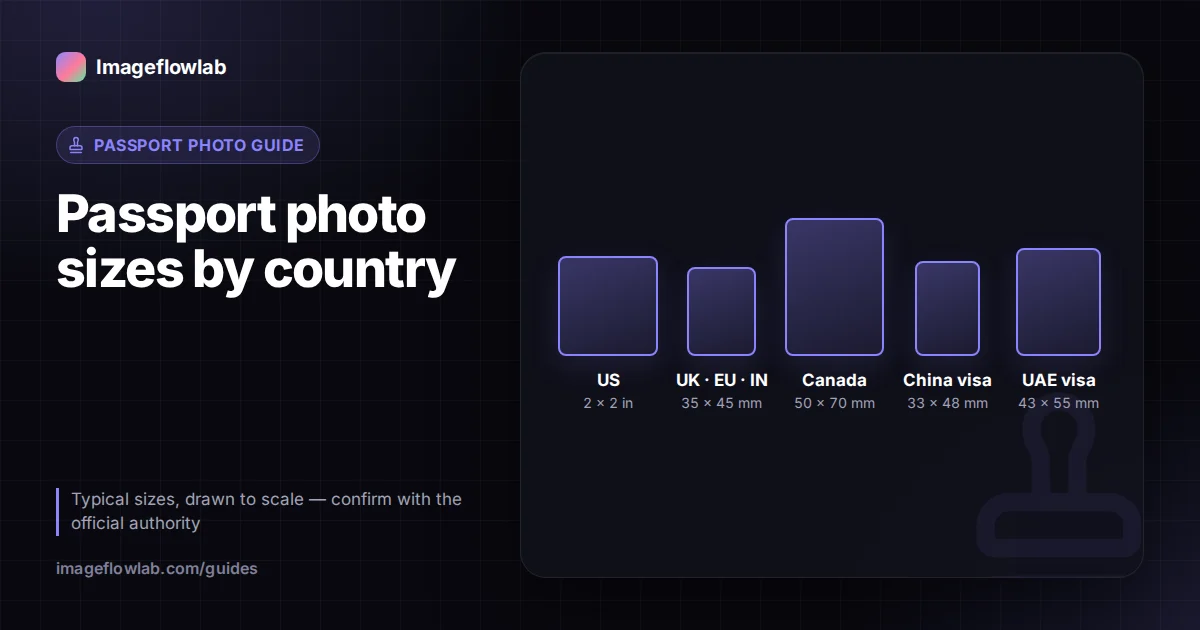
Most of the world uses a 35 × 45 mm passport photo, including the UK, the Schengen area, Australia and India. The main exceptions are the United States (2 × 2 inches, about 51 × 51 mm), Canada (50 × 70 mm) and China's visa photo (33 × 48 mm). The outer size is only half the rule, though: each authority also sets how large your head must be, what the background looks like and whether it wants a print or a digital file.
What size is a passport photo in each country?
Typical requirements are below. A visa can have a different photo rule from the same country's passport, so confirm with the source in the last column.
| Country / document | Photo size | Head height (chin to crown) | Background | Where to check |
|---|---|---|---|---|
| United States passport and visa | 2 × 2 in (51 × 51 mm) | 1–1⅜ in (25–35 mm) | White or off-white | US State Department |
| United Kingdom passport | 35 × 45 mm | 29–34 mm | Plain cream or light grey | HM Passport Office (gov.uk) |
| Schengen visa / EU passports | 35 × 45 mm | About 70–80% of the height (32–36 mm) | Light, plain | The consulate or national authority |
| Australia passport | 35 × 45 mm | 32–36 mm | Plain white or light grey | Australian Passport Office |
| India passport | 35 × 45 mm | Face fills most of the frame | Plain white | Passport Seva / your embassy |
| India visa | 2 × 2 in | 25–35 mm | White or light | Indian visa portal |
| Canada passport | 50 × 70 mm | 31–36 mm | Plain white or light | Government of Canada (canada.ca) |
| China visa | 33 × 48 mm | 28–33 mm | White | Chinese visa application centre |
| UAE visa / residence | Commonly 43 × 55 mm | Varies by service | White | ICP or GDRFA portal |
Rules change and consulates add their own conditions. The official page of the authority receiving your application is the final word.
Why does head size matter as much as photo size?
A photo can be exactly 35 × 45 mm and still be rejected because the head is too small or too large inside it. Passport photos are read by face-matching systems at borders, and those systems expect the face at a predictable scale. That is why most rules give a chin-to-crown range in millimetres, or a percentage of the photo height.
Most of these rules trace back to ICAO, the UN aviation agency that sets standards for machine-readable travel documents, which is why so many countries have the face fill roughly 70–80% of the photo height. The US expresses the same idea in inches: 1 to 1⅜ inches from chin to top of hair.
Worked example: checking a UK photo
A UK photo is 45 mm tall and the head must be 29–34 mm. If you take a 3000-pixel-tall portrait and crop it to 35 × 45 mm, every millimetre of the print equals about 66.7 pixels of the crop (3000 ÷ 45). Your head therefore needs to span roughly 1,930 to 2,270 pixels of that crop. At 300 DPI the finished file is 413 × 531 pixels, and the head should cover about 343 to 402 of those 531 pixels. The passport photo maker draws guide lines at those positions so you can line up your chin and crown without doing the arithmetic.
What background and appearance rules are common?
Background colours differ more than people expect. The US asks for white or off-white, the UK for cream or light grey, and many visa rules simply say white. Beyond colour, the rules overlap heavily:
- Plain and even: no patterns, objects or visible shadows behind the head.
- Neutral expression: mouth closed, eyes open and looking at the camera.
- Face uncovered: hair off the eyes; head coverings only for religious or medical reasons, with the face from chin to forehead visible.
- Glasses: the US has not accepted glasses in passport photos since 2016 except with a medical statement. Other countries may allow them without glare or tinted lenses, but removing them is safest everywhere.
- Recent: many authorities want a photo taken within the last six months that reflects your current appearance.
Digital photo or printed photo?
A printed photo is judged by its physical size in millimetres. A digital photo is judged by pixel dimensions, file size and format, and the authority may not care about millimetres at all.
| Situation | What matters | Typical example |
|---|---|---|
| Paper form or in-person application | Physical size, print quality, unaltered paper | Two identical 35 × 45 mm prints |
| Online passport renewal | Pixel size, KB limit, JPEG format | US online renewal uses a digital photo, commonly 600 × 600 px or larger |
| Online application with a code | Photo from an approved booth or shop | UK and some others accept a digital code from a photo booth |
| Visa portal upload | Square or set ratio, minimum pixels, KB cap | India e-Visa asks for a square JPEG of at least 350 × 350 px |
The link between the two is resolution. A 35 × 45 mm photo saved at 300 DPI is 413 × 531 pixels, and a 2 × 2 inch photo at 300 DPI is 600 × 600 pixels. If a portal states a pixel size, follow it even when it differs from the print size. The guide to image resolution covers how DPI and pixels relate.
How do you make a passport photo for a specific country?
- Stand about a metre in front of a plain, light wall, facing a window so the light falls evenly on your face.
- Have someone take the photo from about 1.5 metres away at eye level. Selfies distort the nose and tilt the face.
- Open the passport photo maker and choose your country's preset, or enter a custom size in mm or inches.
- Use Auto-center face, then fine-tune with zoom and drag until your chin and crown sit between the guide lines.
- If the wall is slightly grey, try the background whitening option. It brightens a plain, evenly lit wall; it is not AI background removal.
- Download a single 300 DPI JPEG for online use (with a maximum KB value if the portal sets one), or a print sheet as JPEG or PDF.
Everything happens in your browser, so the photo stays on your device. If you are printing, set the printer to 100% or actual size, then measure one photo with a ruler before cutting the sheet.
Frequently asked questions
Summary
Start with the size for your country: 35 × 45 mm for most of Europe, the UK, Australia and India, 2 × 2 inches for the US, 50 × 70 mm for Canada and 33 × 48 mm for a China visa. Then meet the head-size and background rules, and decide whether you need a print or a digital file. Confirm the details with the official authority, then use the passport photo maker to crop to the right guides and download a ready file or print sheet.