Favicon Sizes Guide
Which favicon sizes a site needs today: favicon.ico, SVG, 180 px apple-touch-icon and 192/512 px manifest icons, plus copy-ready HTML tags and test steps.
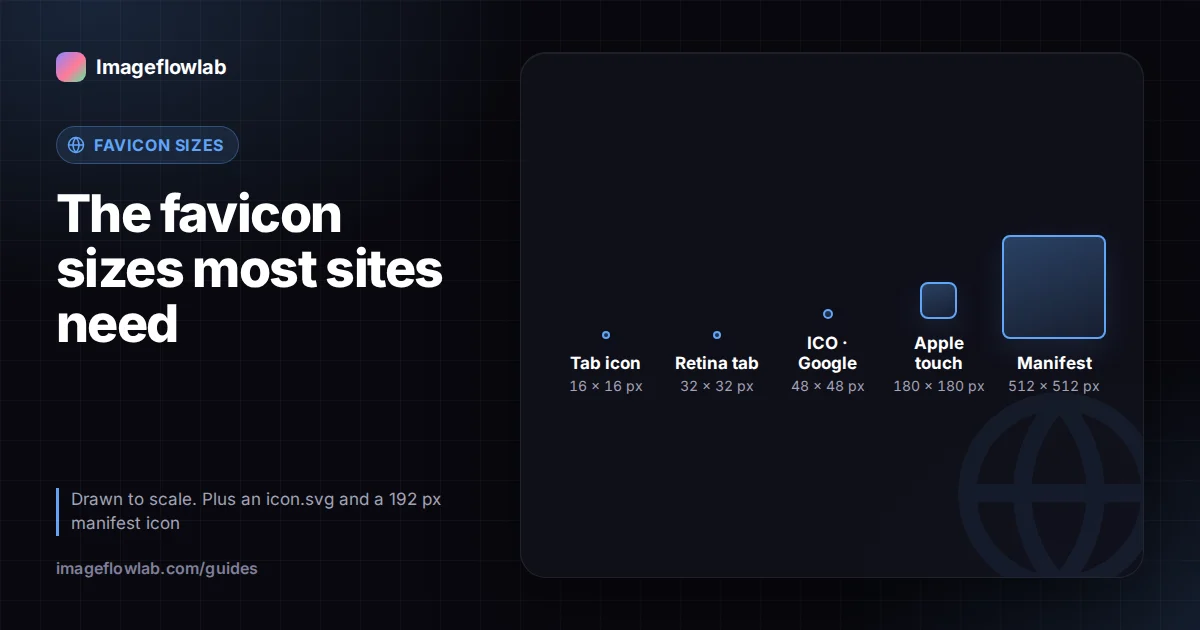
Most websites need only four icon files: a favicon.ico containing 16, 32 and 48 px versions, a scalable SVG icon, a 180 × 180 px apple-touch-icon for iPhones and iPads, and 192 and 512 px PNGs listed in a web app manifest. Everything else, such as dozens of platform-specific sizes, is optional. This guide explains what each file does, gives you the HTML to link them, and shows how to check that they work.
Which favicon sizes do you actually need?
A favicon appears in many places: browser tabs, bookmarks, history, search results, phone home screens and installed web apps. Each place picks the file and size it prefers. A small, well-chosen set covers nearly all of them.
| File | Size | Where it is used | Required? |
|---|---|---|---|
| favicon.ico | 16, 32, 48 px (more optional) | Browser tabs, bookmarks, older browsers, Windows shortcuts | Strongly recommended |
| icon.svg | Scalable | Modern browsers; can adapt to dark mode | Recommended |
| apple-touch-icon.png | 180 × 180 px | iOS and iPadOS "Add to Home Screen" | Recommended |
| Manifest icon | 192 × 192 px | Android home screen, install prompts | For installable sites |
| Manifest icon | 512 × 512 px | Splash screens, app stores for web apps | For installable sites |
The ICO format is unusual because one file can hold several images. A browser drawing a 16 px tab icon picks the 16 px entry, while a high-density screen showing the same tab at twice the resolution picks 32 px. That is why a single favicon.ico with multiple sizes is still the safest foundation.
What does Google need for search results?
Google shows a site's favicon next to its listing in search results. Google's favicon guidelines in Search Central ask for a square icon and, at the time of writing, recommend that raster favicons be a multiple of 48 px, for example 48 × 48, 96 × 96 or 144 × 144. SVG files have no fixed size and are also accepted.
Google's requirements can change, so check that page if your icon isn't showing up. A few points have been stable for a long time:
- The favicon must be linked from your home page with a
rel="icon"tag, and Google must be allowed to crawl both the page and the icon file. - The icon should represent your brand and be readable at small sizes.
- Changes are not instant. Google picks up a new favicon when it recrawls your home page, which can take days or weeks.
How do you link favicons in HTML?
Put these tags inside the <head> of every page, adjusting paths to match where your files live:
<link rel="icon" href="/favicon.ico" sizes="32x32">
<link rel="icon" href="/icon.svg" type="image/svg+xml">
<link rel="apple-touch-icon" href="/apple-touch-icon.png">
<link rel="manifest" href="/manifest.webmanifest">
What each line does:
- favicon.ico is the fallback that almost every browser understands. Some developers add
sizes="32x32"so that browsers supporting SVG choose the SVG instead; the exact selection rules differ between browsers. - icon.svg stays sharp at any size and can include a CSS media query for dark mode.
- apple-touch-icon is used by Safari on iOS when someone adds your site to their home screen. Use an opaque background, because transparent areas may be shown as black.
- manifest points to a small JSON file listing your 192 and 512 px PNG icons.
A minimal manifest icon entry looks like this:
"icons": [
  { "src": "/icon-192.png", "sizes": "192x192", "type": "image/png" },
  { "src": "/icon-512.png", "sizes": "512x512", "type": "image/png" }
]
Keep a copy of favicon.ico in the root of your site as well. Some tools and older browsers request /favicon.ico directly without reading your HTML.
How should you design a favicon that works at 16 px?
A 16 × 16 icon has only 256 pixels. Detail that looks great on a business card disappears completely.
- Simplify. Use the logo's symbol or a single letter rather than the full wordmark with tagline.
- Go bold. Thin lines blur into grey at small sizes. Thicken strokes or use filled shapes.
- Mind the contrast. Tabs can be light or dark. Test your icon against both, or give it its own background shape.
- Start large and square. Create the master at 512 × 512 px or as a vector, then scale down. Scaling a 32 px image up produces blurry 180 and 512 px icons.
If your logo only exists as a PNG, tracing it to a vector first gives you a clean source for every size. The guide on converting a logo to SVG walks through that process.
Worked example: one logo, a complete icon set
Suppose you start with a 1024 × 1024 px transparent PNG of your symbol.
- Upload it to the favicon generator. It produces one favicon.ico with nine sizes: 16, 24, 32, 48, 64, 72, 96, 128 and 256 px. This includes 48 and 96 px, both multiples of 48, for Google.
- Resize the same PNG to 180 × 180 px, place it on a solid background colour, and save it as apple-touch-icon.png.
- Resize it to 192 × 192 and 512 × 512 px for the manifest. A free image resizer handles these exact pixel sizes.
- If you have the logo as SVG, save a simplified version as icon.svg.
- Upload all files to your site root and add the link tags above.
The generator works in your browser, so the logo is not uploaded. It only creates the ICO file; the PNG icons are separate exports.
How do you test your favicon?
- Open the file directly. Visit
yourdomain.com/favicon.icoand each other icon URL. A 404 means the path is wrong. - Check the tab. Load your site in a private window. Browsers cache favicons aggressively, so a normal window may still show the old icon.
- Check light and dark themes. Switch your system or browser theme and confirm the icon is visible in both.
- Add to home screen. On an iPhone and an Android phone, add the site to the home screen and look at the icon edges and background.
- Inspect the manifest. In Chrome's developer tools, the Application panel shows the manifest and flags missing or wrong-sized icons.
- Watch search results. After Google recrawls your home page, search for your site name and check the icon beside the result.
Frequently asked questions
Summary
A complete, modern favicon setup is a multi-size favicon.ico, an optional SVG, a 180 px apple-touch-icon and 192 and 512 px manifest icons, linked with four tags in your page head. Keep the design simple enough to read at 16 px, follow Google's square, multiple-of-48 guidance, and test in a private window. To build the ICO from your logo in one step, use the favicon generator.