IBPS & SBI Photo, Signature, Thumb Impression & Declaration
IBPS and SBI upload sizes for photo, signature, left thumb impression and handwritten declaration, with typical pixels, KB limits and preparation steps.
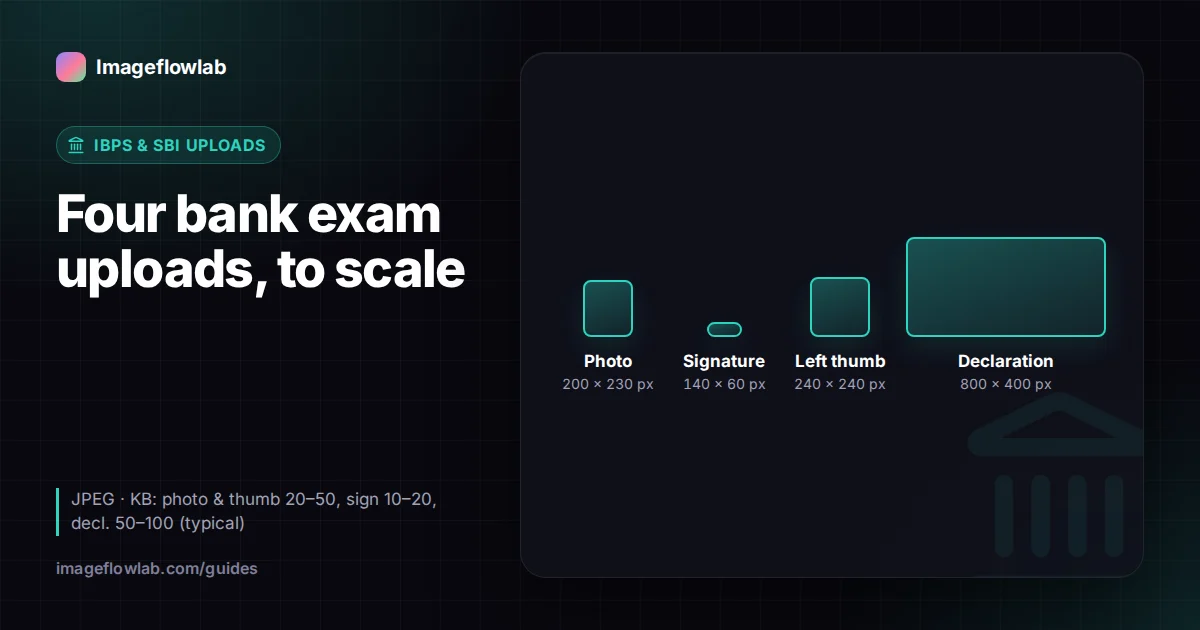
IBPS and SBI applications typically ask for four uploads: a photograph (200 × 230 px, 20–50 KB), a signature (140 × 60 px, 10–20 KB), a left thumb impression (240 × 240 px, 20–50 KB) and a handwritten declaration (800 × 400 px, 50–100 KB), all as JPEG files. These values have stayed fairly stable across PO, Clerk and SO recruitments, but every notification restates them, and that document is the one to follow.
What are the IBPS and SBI upload requirements?
Both IBPS and SBI publish a "guidelines for scanning and upload of documents" annexure with each recruitment notification. Recent annexures from both bodies have used very similar numbers, which is why candidates often prepare one set of files for several bank exams. The table summarises the typical values.
| Document | Typical pixels | Typical file size | Physical equivalent (200 DPI) |
|---|---|---|---|
| Photograph | 200 × 230 px | 20–50 KB | About 2.5 × 2.9 cm |
| Signature | 140 × 60 px | 10–20 KB | About 1.8 × 0.8 cm |
| Left thumb impression | 240 × 240 px | 20–50 KB | 3 × 3 cm |
| Handwritten declaration | 800 × 400 px | 50–100 KB | 10 × 5 cm |
Typical values only. Check the annexure in the IBPS notification on ibps.in or the SBI careers notice for your post. Some recent applications have also added steps such as live photo capture, so read the whole procedure.
How should the photograph look?
The bank exam photo is a recent, colour, passport-style photo. The annexures usually ask for a light background (white is safest), a face that fills most of the frame and a straight-on view with both eyes open. Caps, hats and dark glasses are not allowed; religious headwear is generally accepted if it does not cover the face. If you normally wear spectacles, avoid glare on the lenses, or remove them.
The same photo is checked against you at the exam venue, at the interview and at joining. Many candidates keep a few printed copies of exactly the same image, because some exams ask you to paste one on the call letter.
How should the signature be done?
Sign on white paper with a black ink pen. The notices are specific on a few points:
- The signature must be your own, not someone else's.
- Signatures in CAPITAL LETTERS are not accepted.
- It is used on the call letter and wherever a signature is needed, so you will be asked to sign the same way at the exam.
- Only the signature should appear in the image, with no lines or text around it.
How do you take a left thumb impression for IBPS?
The thumb impression is the upload people are least sure about. It is a print of your left thumb, made with ink on white paper, then scanned or photographed.
- Use a blue or black stamp pad. Too much ink smudges the ridges; press the thumb on scrap paper once before the real print.
- Roll the thumb gently from one side to the other on plain white paper so the full pad of the thumb is recorded.
- Let it dry for a minute so it does not smear.
- Photograph it straight from above in good daylight, with no shadow from the phone.
- Crop to a square around the print with a little white margin, then resize to the pixel and KB values in your notice.
Notices have generally allowed the right thumb if a candidate does not have a left thumb, but follow the exact wording in yours.
What should the handwritten declaration say?
The declaration is a short paragraph you write by hand on white paper, in English, in black ink, and sign. Recent IBPS and SBI notices have used text along these lines:
"I, _______ (Name of the candidate), hereby declare that all the information submitted by me in the application form is correct, true and valid. I will present the supporting documents as and when required."
Copy the exact wording from your own notice, because it may differ slightly. A few rules come up every time: it must be in your own handwriting, it must not be written in capital letters, and someone else writing it on your behalf is not allowed. Write on unlined paper so the text stays readable after compression, and keep it in a block roughly twice as wide as it is tall, matching the 800 × 400 px shape.
How do you resize each file to the right size?
The exam photo resizer has an IBPS / SBI preset that fills in 200 × 230 px and 20–50 KB. You crop the face in the frame, and the tool encodes a JPEG inside that range and lists the final pixels and KB. For the signature, the signature resizer has the matching 140 × 60 px, 10–20 KB preset and can auto-crop to the ink and whiten the paper.
For the thumb impression and declaration, use the Custom option in the signature resizer and type in the pixel size and KB range. Ink on white paper is exactly what its auto-crop and background cleaning are built for. Clean background also converts the image to grayscale; if your notice asks for colour, untick it.
Worked example: preparing the declaration
You write the declaration on an A4 sheet and photograph it with a phone, giving a 4000 × 3000 px image of about 3.5 MB. The text block is roughly 2600 × 1300 px. In the signature resizer you choose Custom, enter 800 × 400 px and 50–100 KB, and let auto-crop find the ink. The block already has a 2 : 1 shape, so it scales cleanly to 800 × 400 px. A handwritten paragraph contains more detail than a signature, so it usually reaches 50–100 KB at a normal JPEG quality, and the checks show the final size before you download.
Why do bank exam uploads get rejected?
| Problem | Fix |
|---|---|
| Signature or declaration in capitals | Rewrite in normal running handwriting |
| Declaration typed or written by someone else | Write it yourself, by hand |
| Smudged or faint thumb print | Less ink, firm press, retake in daylight |
| Files uploaded in the wrong slots | Name files clearly before uploading |
| Size outside the KB range | Re-encode within the stated range |
| Photo dark, blurred or with a busy background | Retake facing a window against a light wall |
A wrong slot is a surprisingly common slip, because the thumb print and signature look similar as thumbnails. Download names from the Imageflowlab tools include the pixel size and KB, which makes them easy to tell apart. The SSC photo and signature guide covers the SSC side if you are applying to both.
Frequently asked questions
Summary
For IBPS and SBI you typically need a 200 × 230 px photo, a 140 × 60 px signature, a 240 × 240 px left thumb impression and an 800 × 400 px handwritten declaration, each as a JPEG within its KB range. Write and sign everything yourself in black ink on white paper, avoid capital letters, and check the numbers against your notification. Then use the exam photo resizer for the photo and the signature resizer's presets and Custom mode for the rest.